Spatial Debt
When I was a young (and redundantly poor) college/university student who did not possess much, I obsessively collected and maintained whatever I owned, whether that was books, computers, receipts, guitars, music, magazines, et cetera. What was once contained to a small dorm room eventually expanded to fill up a house.
With every new item we add, regardless if it is large or small, we take on additional spatial debt. That becomes one more item to clean, transport, and eventually dispose of. Larger items such as furniture can be as much of a burden as the smaller stuff. Things like couches, TVs, computers and bookcases take up large amounts of space, but they are fairly limited in number. My true nemesis is the boxes of papers which continually grow, generally filled with mail. This is death by a thousand cuts, since combatting the swell of papers is a never ending battle which requires regular maintenance. This is not a “one and done” task, but an exhausting, reoccurring event.
I finally cleared out the remains of several broken down entertainment centers which had been laying in my garage for a number of months. The difficulty here was trying to dispose of the remains in a responsible way. The remnants were mostly comprised of particleboard, which is not easily recyclable. I scouted around at a couple of places which could reuse good pieces of wood. “Good” being the keyword here, which particleboard and chipboard are not, pretty much being leftovers being glued and compressed to resemble a proper piece of wood. Due to the glue and laminate, they are generally hazardous to burn, so throwing them into a fire pit was not a healthy or safe option. I did finally find one place which takes various odds and ends, but it came at a cost of $50 per ton. I could have just thrown the old entertainment centers away (or hope that the garbage trucks would take them), but they would just end up rotting in a dump, and I preferred that they would be handled in a more responsible fashion.
Still, even after these entertainment centers had outlived their usefulness, there was a debt incurred afterwards. Until they were finally recycled, the junk took up space in the garage. Once I did finally take care of them, it required time, money and effort to properly dispose of them.
Every time you think about getting something new, consider if you are willing to give up something else in trade. Without continual maintenance, it becomes far too easy to let all of the “stuff” build up and transform from a simple molehill into a mountain. This mountain represents your spatial debt, which can easily become overwhelming to handle. It is best to never get yourself into this debt in the first place, but even if you are already facing the Sisyphean task of reducing the clutter, a good starting point is to stop adding onto the debt and then begin chipping away. Much like losing weight, it is not a battle that will be quickly or easily won, but with the proper perseverance, that mountain will eventually be reduced back to a molehill.
Solar Powered Accessories for Mobile
Solio CLASSIC2

The CLASSIC2 inherits the best elements of its earlier siblings, the original Solio CLASSIC and the Solio BOLT. The CLASSIC2 maintains the general shape and fold-out petal appearance of the original CLASSIC, but it is larger, which allows for larger solar panels and a larger 3200 mAh battery, nearly twice the capacity of the CLASSIC’s 1650 mAh battery.
The similarities between the CLASSIC and the CLASSIC2 end there, as the CLASSIC2 eschews the custom ports and cables of its predecessor and follows the BOLT’s model by opting for standard USB ports. A standard full-sized 5W USB port provides for a convenient method to charge a variety of phones. An additional benefit for Apple devices (iPhones, iPod touches, and iPads) is the Apple-optimized charging feature, which can be turned on by holding down the power button for five seconds. To return to normal charging mode, hold the power button down for another five seconds until the button flashes green.
The primary method of charging the Solio CLASSIC2 is by the sun, but it also has the capability to be charged via auxiliary power through the micro-USB port. This allows the CLASSIC2 to be charged via another connected solar panel or from a traditional power source.
Compact, flexible, and useful, the CLASSIC2 continues the Solio tradition of providing portable solar charging to the market.
Logitech Solar Keyboard Folio for iPad

Despite that mouthful of a product name, the only ornament on the outside of the rubbery-leather case is the Logitech logo and a row of solar panels. Like Logitech’s other forays with solar-powered keyboards, the Folio cautiously sips energy while the solar panels keep the batteries charged. Such energy conversation practically eradicates the worry that the device will run out of power like standard wireless peripherals, which can eat through batteries every couple of months.
The Folio communicates with the iPad via Bluetooth, but when not in use, both the keyboard and the iPad are put to sleep, which further assists in saving unnecessary battery drain.
The Solar Keyboard Folio’s dual nature as both a case and a built-in keyboard provide this to be a useful and practical iPad accessory, without bringing the hassle of monitoring and replacing batteries, thanks to the solar powered panels along the top of the case.
Solar Powered Sunglasses + Dinosaur Energy
A couple of ideas which I have recently been mulling over…
Solar Powered Sunglasses
With the sun staring me in the face while I was driving, I wondered why there aren’t any solar powered sun glasses available. If solar panels can make use of UV rays (which a good pair of sunglasses also try to absorb to protect your eyes), why not design a pair of sunglasses with lenses made out of thin, semi-opaque solar cells?
After a little searching, I discovered that this idea isn’t wholly original. As the Digital Trends site mentions, this is one of those “Why didn’t I think of that” ideas. However, the reported Ray-Ban Shama Shade has only a thin strip of PV cells along the arms of the glasses, which hardly provides even a nominal amount of space to produce even a decent amount of energy.
My initial idea was a little closer to the Spider-man looking glasses by Yanko Design which uses lenses with dye solar cells . However, I have not been able to find much information about these glasses, so they might have been more of a concept product or limited to specific markets.
Perhaps this concept could be extended to a product like Google Glass, where solar cells could be used to give a supportive boost for the battery life.
Extending upon the idea of using semi-opaque solar cells and glass could be better utilized with large windows which could provide a decent amount of energy to help provide power to a building or other structure.
Dinosaur Energy
When I came up with the term “Dinosaur Energy” several months ago, I was surprised that this phrase wasn’t already more prevalent, especially considering the clever dual meanings it has.
- Non-renewable resources such as oil and coal are formed from the ancient remains of organic matter (e.g. plants, animals). Hence, these sources of energy truly might have derived from dinosaur remnants.
- The term “dinosaur” is also a person or thing that is outdated and has became obsolete due to the inability to adapt to the changing environment. In the computer world, a computer more than a couple of years ago becomes a “dinosaur” or “relic”. This also reflects where the oil and coal industries are heading. Their deaths have been predicted for many years, but the stranglehold these industries have on today’s society has prevented them from dying quickly. However, their reign will eventually come to an end, especially once cleaner (and cheaper) technologies supplant them. Given enough time, effort, and economy, there will be a brighter energy future in stock for us. How quickly we can realize this dream is dependent upon our efforts.
Green Festival 2012
The Green Festival returned to Navy Pier in Chicago this year. The highlight of the festival was the opportunity to test out the new Ford Focus Electric around the pier. It drives quite well, is very quiet, but only gets around 70 miles to the charge. As with most electric vehicles, they don’t offer too much milage outside of a few quick errands before needing to plug in again. Until EVs can get up to 300+ miles to the charge, they will not be able to act as a primary vehicle for many people.
Links
- Green Festival : http://www.greenfestivals.org/chi/updates/
- Solar Goose : http://www.solargoose.com/
- Ford Focus Electric : http://www.ford.com/electric/focuselectric/2012/
- Helios Solar Works : http://www.heliossolarworks.com/
- Solar Service : http://www.solarserviceinc.com/

Solar Charger Roundup
This is a quick roundup of my favorite three solar chargers with their respective pros and cons.
Changers Starter Kit
Pros
- Unique design
- Social networking aspects
- Detachable battery
- Eco-conscious packaging
- Micro-USB cable works well with the mophie battery pack
- Standard USB port
Cons
- Solar panel not very strong (needs excellent light source to work effectively)
- Doesn’t always fully charge some devices
Details
- Price: $149 / €119
- Manufacturer: Changers GmbH
- Website: http://www.changers.com
JOOS Orange
Pros
- Large battery
- Large solar panels which charge at a decent rate
- Strong, durable, and waterproof
- myJOOS software available for both Windows and Mac
- Adjustable legs
- Works in hot conditions
- iPad compatible
Cons
- No lights blink if the device is full
- myJOOS software needs work (still not compatible with Lion)
- microUSB cable difficult to insert
- Yet more adapters
Details
- Price: $149
- Manufacturer: Solar Components, LLC
- Website: http://www.solarjoos.com
Solio BOLT
Pros
- Fast Apple-charging mode
- Portable
- Standard USB port
Cons
- Can take several days to charge the internal battery
- Too easy to leave the power on
Details
- Price: $70
- Manufacturer: Bettery Energy Systems Inc.
- Website: http://www.solio.com
JOOS Orange Redux
One of the niceties of the JOOS Orange is its software companion, myJOOS. Lately, the software wasn’t recognizing when my JOOS Orange was plugged into my computer (a MacBook Pro). I then checked the System Profiler and saw that the JOOS Orange wasn’t even being recognized as a connected USB device. Something was definitely wrong. I contacted Solar Component’s customer service for assistance, and they requested that I return the defective unit to be either repaired or replaced.
I now have a new-to-me JOOS Orange, and I’m happy to report that it is working better than before. It is being recognized by my computer and the myJOOS application. Even better is that it now consistently charges older iOS devices, such as the iPhone 3GS and iPhone 4, where my previous JOOS Orange often had a difficult time being connected consistently to these devices.
In my earlier review, I spent a good portion of the article critiquing the myJOOS software. I then later discovered that this software isn’t currently compatible with Mac OS X 10.7 “Lion”, yet. The myJOOS web page had further details:
*** WE ARE AWARE THAT THE MYJOOS APPLICATION DOES NOT WORK WITH MAC OSX LION (10.7). WE ARE WORKING ON A FIX TO THIS PROBLEM AND HOPE TO HAVE IT AVAILABLE FOR YOU SOON ***
*** The myJOOS application was actually designed so we could test and run quality control checks on the JOOS Orange in our factory before shipping them out to you. We thought it would be cool to offer the app to our customers so they could see the exact same data we were seeing in our tests. While we have made every attempt to make the application accurate and informative, it is important to note, it is only a beta version of what we plan to offer in the future.
I appreciate these details from the company, and that they recognize that a problem does exist. This software has some interesting potential, which I hope to see fulfilled at some time in the future.
Efficiency
A recent Wired article reviewed four solar chargers, which included the JOOS Orange and the Solio BOLT. One of the criticisms of the BOLT was that the smaller set of solar panels couldn’t compete well against the other products which featured larger solar panels. Common sense would indicate that larger panels would be able to generate more energy. Seems straightforward, right? More panels = more power. Well, yes — to a point. However, the devilish details tend to make the facts a little fuzzy around the edges, which makes apple-to-apple comparisons difficult.
From what I’ve been told, the JOOS Orange has some of the best solar panels out there — it’s not just the size, but the quality and efficiency of the panels which allow them to generate so much power. From my own experience, the larger panels and battery of the JOOS Orange have been distinct advantages over its competition. Rarely have I been able to fully drain the JOOS Orange’s battery when charging up my devices.
WIRED’s article mentions that it took 9 hours to fill up the BOLT’S 7.4 Wh battery. Now, what if the BOLT’s solar panels were so efficient that they could fully charge the battery in 2 hours, instead of 9? Perhaps it is time to jump into the Delorean and set the course for the future.
What will solar chargers be like in 5, 10, or 20 years in the future? If the nascent consumer solar charger market can make similar strides that computers have performed, then there is the possibility that solar chargers will be a common household appliance. For that to occur, we’ll need to see great leaps in improvement in the efficiency of three areas: solar, batteries, and energy.
Solar Efficiency
The most obvious of the three areas. Most solar panels are only 10 – 15% efficient in converting solar energy into electricity. Being able to generate more power with the same surface area is a key goal. But even the most efficient of today’s solar panels only reach around 20%, a far cry from the level that we’d like to achieve. Ideally, a solar charger would be able to collect and store more energy than a person could reasonably use.
Battery Efficiency
The battery industry has tremendous potential and hurtles to meet current and future demands at both the consumer and industrial level.
Two decades ago, the word “battery” would have elicited thoughts of Energizer or Duracell. The need for powerful and efficient batteries has become ever more necessary in a world filled with mobile devices (laptops, phones, tablets, etc.). The third generation iPad increased its battery size to 42.5 Wh (versus the iPad 2’s 25Wh battery) to maintain up to a 10 hour charge while being able to power the higher resolution display and LTE networking. The latest mobile phones struggle to go through a full day without draining their batteries. The need for solar chargers to contain more efficient batteries is no less.
Energy Efficiency
Long before one should venture into the costly realm of installing a solar array for their house, one can perform other measures to reduce the amount of electricity they consume by using more energy efficient appliances, disconnecting machines from the wall when not in use, and just using less in general.
The aforementioned iPad increased its battery storage to be able to support the new features. Phones such as the EVO 4G bleed through its battery due to its many antennae (WiMAX, 3G, WiFi) searching for signals. A compromise between both software and hardware is needed to improve the overall performance and efficiency of mobile devices. With less power used should lead to needing to charge the phone fewer times, which lengthens the life of the battery, in addition to improving the user experience with fewer charges.
To be able to meet the demand of charging up several mobile devices, I make use of four solar chargers (JOOS Orange, Solio BOLT, Solio Classic-i, Changers). Still, this is only a small step towards a brighter and more energy efficient future.
Honeywell-Nest Lawsuit
Honeywell-Nest Lawsuit
On Monday 6 February 2012, Honeywell filed a suit against Nest for allegedly infringing upon several of Honeywell’s patents. GigaOm summarized these offending patents:
- Natural Language Installer Set Up for Controller
- Controller Interface with Dynamic Schedule Display
- HVAC Controller
- Thermostat with Mechanical User Interface
- Thermostat with Offset Drive
- Power Stealing Control Devices
- Profile Based Method for Deriving a Temperature Setpoint Using a ‘Delta’ Based On Cross-Indexing a Received Price-Point Level Signal.
Nest provided a kick in the pants to the HVAC industry, which we haven’t seen since the iPhone debuted to shake up the mobile phone world. This is not too surprising since one of the founders of Nest is Tony Fadell, who had worked on the iPod and iPhone at Apple, Inc.
If Honeywell could prove that Yoky Matsuoka had filched algorithms from Honeywell on determining on how to regulate temperature, then there might be some validity to Honeywell’s claims. Yet, none of the patents seem to focus on the elements which truly separate the Nest from the competition.
Nest has been quite open about the process they used to design and construct the Nest. As Tondy Fadell has mentioned in interviews, there is essentially a smart phone crammed into the Nest smart thermostat. I see nothing even close to the Nest thermostat provided by Honeywell. The only comparable programable thermostat that comes to my mind is the Ecobee, and I haven’t heard about Honeywell trying to sue Ecobee.
When was the last time someone was excited about a Honeywell thermostat? Have any tech sites done a tear down to see what makes a Honeywell thermostat tick? Honeywell has even admitted to have looked into smart thermostats years ago, but decided to pass. Then a newcomer enters the market and does what Honeywell did not, and now Honeywell is fuming and wants a piece of the pie.
Honeywell was passed by Nest, and now they are trying to catch up, not by developing their own innovative product, but by trying to beat their competitor with their patent portfolio. As we can see in the mobile phone industry where everyone is trying to sue everyone else, the attitude of being trigger-happy with frivolous lawsuits will only result in far more damage than it will help to protect the greater interest and well-being of all parties.
References
- http://www.nest.com/
- http://www.wired.com/gadgetlab/2011/10/nest_thermostat/all/1
- http://gigaom.com/cleantech/introducing-a-thermostat-steve-jobs-would-love-nest/
- http://www.macrumors.com/2011/10/25/ipod-creator-tony-fadells-next-quest-is-to-revolutionize-thermostats/
- http://gigaom.com/cleantech/honeywell-hits-nest-with-a-law-suit-over-smart-thermostat/
Changers Startup Kit

As my collection of solar-powered devices grows, I need to become more selective on what to try out to determine if this could be a useful device on an everyday basis.
In October 2011, the Berlin startup Changers GmbH introduced the Changers Starter Kit. The hardware is a little unusual in its appearance, but the true differentiator is the social networking aspects tied to the device.
This is solar charging with an attitude.
Unboxing + Manual
Like any good eco-conscious product, the packaging is constructed from corrugated cardboard, formed from renewable resources, and of course, completely recyclable. An interesting phrase on the box says “Ich bin ein Berliner.” I find this curious, since that is the famous line by JFK, where the correct phrase probably should have been “Ich bin Berliner.” Or maybe this solar kit was developed by some hyperpandimensional jelly donuts. Or perhaps they are Germans with a sense of humor. Or my German instructors were lying to me all this time.
The fold-out manual is constructed from 100% recycled paper. Also, to reduce paper waste, the fold-out manual is only available in English, but other manuals can be downloaded from the Changers website at http://www.changers.com/en/downloads. Considering that Changers is based out of Germany, I was curious if the manual would have any translation errors. The first word on the manual is “Initialize”, which is interesting that the American version of that word was used. However, there is a small goof which says “0 to 0,3 Watt”, which would be correct in some languages, just not American English. Yet, this is not a mere manual, but part manifesto with declarations of life, liberty, and the pursuit of delicious creme-filled donuts (I could go for a Bavarian or Boston Cream about now).
Hardware
The Changers Starter Kit comes with two main components: the Kalhuohfummi™ solar battery and the Maroshi™ solar module. (For the background history on these unusual names, read this blog post. I’ll wait….) Upon first seeing the detached design between the battery and the solar module, I thought that this might be somewhat unwieldy by separating the components. However, after using it, this approach does have distinct advantages by allowing the solar panel to remain thin, flexible, and light. The battery easily detaches, which then can be carried around in a coat pocket. Another advantage to having a separate solar panel component is the potential to chain together several panels to charge up one battery. The Kalhuohfummi™ has two USB ports on it, a standard USB port for power out and a micro-USB port for data. The included USB-to-micro-USB cable works well for my set up since I can use this cable to transmit data between Kalhuohfummi™ and my computer, and then switch the cable around and charge up my mophie Juice Air, which has a micro-USB port on it. Like most other chargers, there are a variety of other adapter tips, but I haven’t had to use them so far.
One thing which did not work out too well for me is the suction cups on the Maroshi™. One of the suction cups works, but the other one keeps detaching. Or perhaps I just have an aversion to licking suction cups.
However, for this set up to work best, the device needs to be exposed to strong sun rays, otherwise, it will collect very little to no energy.
Early pictures of Maroshi™ displayed the Holstee Manifesto, however, my device did not, which is too bad, since I enjoy seeing these nice touches. Yet, including such a manifesto echoes the solar revolution Changers is heading. [UPDATE: Another review mentions that the manifesto is only printed on a special edition version of the kit.]
Software
The key element which separates Changers from other solar chargers is in the software. A desktop application (available for Windows, Macintosh, and Linux) collects data from Kalhuohfummi™ and then uploads the information to the Changers website.
The Changers website is Facebook for solar power addicts. The design of the site and manuals even has a Facebook meets Google aesthetic. Each night, I enjoy plugging in the Kalhuohfummi™ and seeing how much energy I generated that day. The community appears to be fairly small right now, but the Changers crew are the first ones I’ve seen to actively embrace this idea (so far).
One nice touch is that the CO2 savings on the website are measured in kilograms, not pounds. Let’s face it — instead of stuffing our faces with donuts (no matter how delicious they might be), Americans should be doing something useful like encouraging the adoption of solar power and the metric system!
Summary
This is no mere solar charger. This is a mission from (the sun) god. Harvest the sun and have fun while doing it. This is a way of life. Embrace the change and make a change for the better.
Pros
- Unique design
- Social networking aspects
- Detachable battery
- Eco-conscious packaging
- Micro-USB cable works well with my mophie battery pack
- Standard USB port
- Solar panel not very strong (needs excellent light source to work)
- Suction cups suck (or perhaps, because they don’t suck)
- Name: Changers Starter Kit
- Price: $149 (USD) / € 119
- Manufacturer: Changers GmbH
- Website: http://www.changers.com
Logitech Wireless Solar Keyboard K750 for Mac
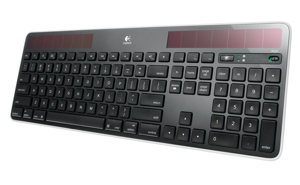
For my birthday, I added to my arsenal of solar-powered products Logitech’s Wireless Solar Keyboard K750 for Mac. I had seen the Windows edition several months prior, and was glad to see that Logitech (a company who has developed products for the Mac, even during the bad-old-days of the mid-90s) produced a Mac-specific version of this keyboard.
My primary interest in this product was due to the solar panels. They pretty much look like enlarged versions of the solar panels found on small calculators, but they certainly perform the job, even in low light conditions. It doesn’t take much light to keep this keyboard charged. The companion Solar App is pretty clever and can be launched by pressing a special key on the keyboard to launch the application, which will display the charge of the battery and how much light the keyboard is receiving. Mac OS 10.6 and 10.7 users can get the free Solar App through the Mac App Store. The Solar App can also be downloaded directly from Logitech’s website for those with an older version of Mac OS X.
The tactile feel of the keyboard is on par with the current Apple chiclet-style keyboards. It has a decent feel, better than the older PowerBook and iBook keyboards, but nowhere nearly as satisfying as the satisfying “click” that I receive on my main keyboard: the Matias Tactile Pro 3. However, the keys are fairly quiet, which is more office-friendly than the much louder Tactile Pro.
The keyboard is amazingly thin, yet it feels quite sturdy, even though it is not made out of metal. The two flip-out feet also keep the keyboard solid while typing.
One concern I had was whether or not this computer would be able to send commands to the computer as it is booting (such as holding down the Alt/Option key). Fortunately, this does work, so if you have more than one operating system set up on your Mac (such as a dual-boot between Mac OS and Windows), this will work. Brownie points earned for the Logitech team for ensuring that important feature was present.
The keyboard communicates with the host computer with a small USB dongle which connects to the computer. The dongle is fairly small and unobtrusive, which I’ve seen before with another Logitech mouse, but since this is a keyboard intended for the Mac, this brings up the question. WHY DOESN’T THE KEYBOARD USE BLUETOOTH?!! Practically every Apple computer since Who-Knows-When has used Bluetooth. Since this keyboard is intended to be used with Macs, why not have use Bluetooth instead of this proprietary USB dongle which takes up an extra USB port? Also, if this keyboard used Bluetooth, it perhaps could be paired up with an iPad, which would have greatly increased the usefulness of this product. If power consumption is an issue with Bluetooth, perhaps Logitech may consider Bluetooth Low Energy (BLE), a new feature in Bluetooth 4.0. Considering that Logitech does make a keyboard for the iPad, it is curious that they did not decide to use Bluetooth for the K750.
However, there is one positive point for using the USB dongle — this keyboard will also work with older Macs which don’t include Bluetooth. I tried using the K750 with a Gigabit PowerMac G4 under OS 9.2, and it worked without any additional drivers needing to be installed.
If you are looking for a new keyboard for your Mac, the K750 is a decent choice for a replacement. The key feature is generating power through solar energy, but the lack of Bluetooth is a major detractor of this keyboard. For the time being, the K750 will serve as a back up keyboard for my purposes.
Pros
- Made for Mac
- Works in low light
- Companion software is a nice addition
- Works when holding down the Alt-Option button at start up
- Works on old Macs
- Thin and sturdy
Cons
- No Bluetooth support
- Still no Bluetooth support
- Requires USB dongle
Details
- Name: Logitech Wireless Solar Keyboard K750 for Mac
- Price: $79.99 (USD)
- Manufacturer: Logitech
- Website: http://www.logitech.com/en-us/keyboards/keyboard/devices/k750-keyboard

